How to Check If a Samsung Phone Is Original: The Complete Authenticity Verification Guide
Counterfeit and cloned Samsung phones have become so advanced that many of them look and even feel like the real thing at first glance. From fake packaging to cloned software interfaces, scammers have gotten better at fooling buyers — which is exactly why knowing how to verify a Samsung phone’s authenticity matters, whether you’re buying new, buying used, or simply double-checking a phone you already own.
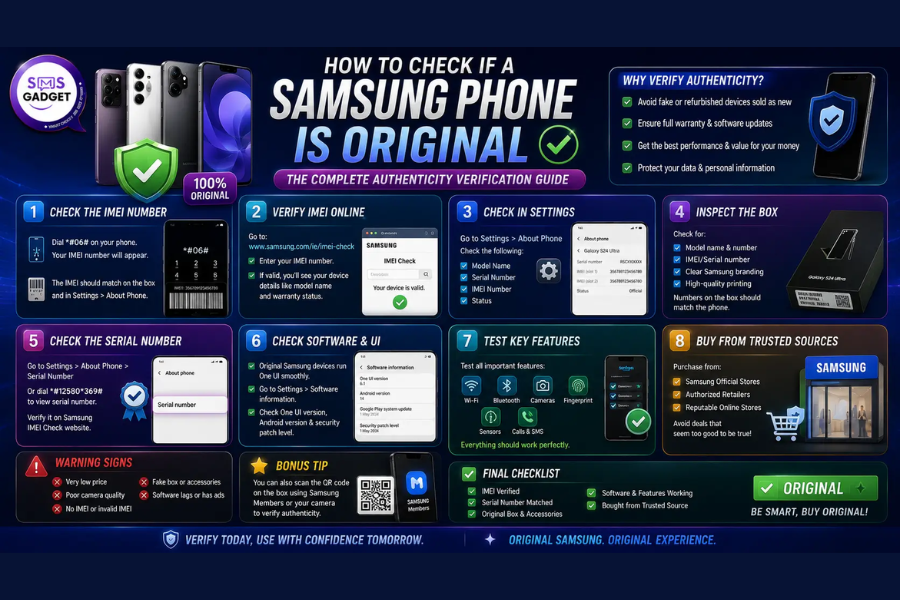
The safest way to avoid this hassle altogether is to buy directly from a Trusted mobile shop in Bangladesh, where devices are verified, warranty-backed, and guaranteed genuine from the start, to check if a Samsung phone is original, dial #06# to view the IMEI number, then verify it matches the box and Samsung’s official records—combined with checking the build quality, software, and Knox security status.
This guide walks through every reliable method to confirm your Samsung phone is genuine, step by step.
Why It’s Important to Verify Your Samsung Phone’s Authenticity?
Before jumping into the steps, it helps to understand what’s actually at risk:
- No official warranty or support: counterfeit devices aren’t eligible for Samsung’s warranty or repair services
- Poor build quality: fake phones use cheaper components that fail faster
- Security risks: counterfeit devices often lack proper security features like Samsung Knox, putting your personal data at risk
- No genuine software updates: fake devices don’t receive real Android or One UI updates, leaving them outdated and vulnerable
- Lower resale value: a counterfeit phone is essentially worthless if you ever try to resell it
With that in mind, here’s exactly how to check.
1. Check the IMEI Number
The IMEI (International Mobile Equipment Identity) is a unique 15-digit number assigned to every genuine mobile device, and it’s the single most reliable way to verify authenticity.
How to find your IMEI:
- Open the phone’s dialer app
- Dial *#06#
- The IMEI number will instantly appear on the screen
- Alternatively, go to Settings > About Phone > Status > IMEI Information
How to verify it:
- Compare the IMEI shown on your phone with the IMEI printed on the retail box—they must match exactly
- Visit Samsung’s official IMEI verification page, or use a trusted third-party IMEI checker
- If the check returns valid Samsung device data (model name, production date, factory code), the phone is genuine
- If the result shows “IMEI Not Found” or returns no Samsung data at all, the device is likely counterfeit or has a tampered mainboard
Bonus tip: An IMEI check can also reveal whether the phone is blacklisted (reported lost or stolen) or has an active Knox Guard/MDM lock — both important things to know before buying a used device.
2. Inspect the Packaging
Genuine Samsung phones ship in high-quality, precisely printed boxes — and counterfeit packaging almost always has small giveaways once you know what to look for.
- Seals and stickers: Authentic boxes have tamper-evident seals that are fully intact. Broken, re-glued, or missing seals are a red flag.
- Logo and branding: The Samsung logo should be crisp, sharp, and correctly spaced—counterfeit boxes often have slightly blurred printing or subtle typos.
- Label details: Check that the model number, serial number, and IMEI printed on the box label match the device itself exactly.
- Included accessories: A genuine retail box includes a properly branded charger/cable, documentation, and a SIM ejector tool — cheap or missing accessories are a warning sign.
3. Examine the Physical Build
Once unboxed, take a close look at the phone itself.
- Logo alignment: On the device, the Samsung logo should be perfectly centered and evenly printed — counterfeit units often have a slightly misaligned or differently colored logo.
- Build quality: Genuine Samsung phones have tight seams, evenly spaced buttons, and a solid, consistent feel. Loose buttons, uneven gaps, or a “light and hollow” feel are common in fakes.
- Display quality: Check brightness, color accuracy, and touch responsiveness. Faded colors or a laggy touchscreen can indicate low-quality counterfeit components.
- Port and button placement: Compare against official images of the same model—counterfeit devices sometimes have slightly shifted port or camera placements that don’t match the real design.
4. Check the Software and Interface
Samsung’s software is one of the hardest things for counterfeiters to replicate accurately.
- Go to Settings > About Phone and confirm the software runs One UI with the Android version listed matching what’s expected for that model
- Open the Samsung Members app — this app is exclusive to genuine Samsung devices and offers built-in diagnostics. If it won’t install or doesn’t recognize your device, that’s a strong warning sign
- Dial *#0*# to open the hidden diagnostic menu, which tests the display, sensors, camera, speakers, and more—a feature unique to real Samsung devices
- Check for Samsung-exclusive features like Bixby, Samsung Pay, Secure Folder, and Samsung Knox—their absence usually means the phone isn’t genuine
5. Verify Samsung Knox Status
Samsung Knox is a built-in, hardware-level security platform found only in authentic Samsung devices.
- Go to Settings > Biometrics and Security and look for Knox-related options such as Secure Folder
- You can also dial *#0*#, then check the diagnostic menu for Knox verification, or use the Samsung Members app to confirm Knox status
- If Knox shows as “tripped,” missing entirely, or the phone doesn’t recognize Knox features at all, this strongly suggests the device is either counterfeit or has been tampered with
6. Test Real-World Performance
Genuine Samsung hardware performs consistently; counterfeit components often reveal themselves under everyday use.
- Multitasking: Open several apps and switch between them. A genuine device should handle this smoothly, without noticeable lag.
- Camera quality: Take a few test photos and videos. Compare the results with official sample images or reviews of the same model — a clear drop in quality is a red flag.
- Battery performance: Genuine Samsung phones offer consistent battery life matching official specifications. Rapid, unexplained battery drain often points to a lower-quality counterfeit battery.
7. Buy Only From Authorized or Trusted Sellers
The most effective way to avoid a counterfeit Samsung phone in the first place is to buy from an authorized retailer rather than an unverified third-party seller. Before purchasing, it’s worth comparing the current Samsung Galaxy mobile price in Bangladesh from verified sellers, since prices that seem unusually low compared to the official market rate are often the clearest early warning sign of a counterfeit or grey-market device.
If you’re ever unsure, contacting Samsung’s official customer support with your IMEI or serial number is the most reliable way to confirm a device is registered as genuine.
Red Flags Checklist: Signs of a Fake Samsung Phone
Quick summary — be cautious if you notice any of the following:
- IMEI doesn’t match the box, or returns no result when checked
- Broken or missing tamper-evident seals on the packaging
- Blurry logo, typos, or poor print quality on the box or device
- Samsung Members app won’t install or doesn’t recognize the device
- Missing Samsung-exclusive features (Knox, Bixby, Secure Folder)
- Noticeably poor camera quality or laggy performance
- Price significantly lower than the official market rate
Frequently Asked Questions
Can a fake Samsung phone still show a valid IMEI?
In rare cases, counterfeit phones use cloned or duplicated IMEI numbers from real devices. This is why it’s important to combine the IMEI check with physical inspection, software checks, and Knox verification rather than relying on just one method.
Does Samsung Knox always indicate authenticity?
Yes — Knox is a hardware-level security feature exclusive to genuine Samsung devices. If your phone doesn’t have any Knox-related settings or the Samsung Members app doesn’t recognize it, that’s a strong sign the device isn’t authentic.
Is it safe to buy a used Samsung phone?
It can be, as long as you verify the IMEI, check the Knox and blacklist status, and confirm the seller is reputable. Always ask for the original box and accessories when possible, as this makes verification easier.
What should I do if I discover my Samsung phone is fake?
Stop using it for sensitive transactions immediately, gather your purchase details and IMEI/serial number, and contact Samsung support or your consumer protection authority. If purchased recently, request a refund from the seller.
Final Thoughts
Verifying a Samsung phone’s authenticity doesn’t require technical expertise — it just takes a few careful checks: the IMEI number, packaging details, physical build, software, and Knox status. Running through these steps takes only a few minutes and can save you from a poor-quality device with no warranty or support.